
mode_colors
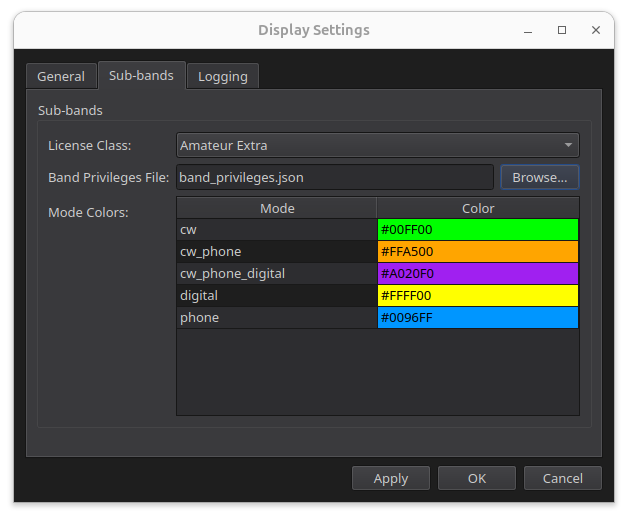
Your list of operating modes, and the color each one is drawn in.
- Define as many modes as you need
- Colors are standard HTML color codes
- The mode name becomes the on-screen label
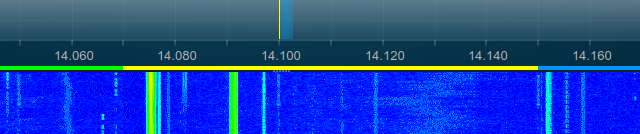
RimuSDR draws a color-coded band privilege bar across the top of the panadapter, so you can see at a glance where the CW, phone, digital, and beacon segments fall on the band you are listening to. RimuSDR ships with the ARRL US plan and IARU Regions 1, 2, and 3 - and if none of those match your country, you can write your own. No programming experience required.
A band plan is a single plain-text .json file with two parts. You can edit it with Notepad, TextEdit, gedit, or any text editor.
Your list of operating modes, and the color each one is drawn in.
Each license class in your country, and the frequency ranges it is allowed.
The ARRL US file is the best one to copy from, because it is the only shipped plan whose license classes have genuinely different privileges. If your country issues a single class of license, the IARU Region files are a simpler starting point, since each defines exactly one.
Do not edit the files that came with RimuSDR. Installing an update replaces them, and your edits would be lost. Start from a fresh copy instead: download one below, save it somewhere you can write to such as your Documents folder, give it a name of your own, and edit that.
Once your file exists, point RimuSDR at it. The panadapter picks up the change immediately - no restart, and no need to reconnect to the radio.
Here is a complete, working file, small enough to read in one go. Everything below explains a piece of it.
{
  "data_version": 1,
  "updated": "2026-08-09",

  "mode_colors": {
    "cw": "#0072B2",
    "phone": "#009E73",
    "digital": "#E69F00",
    "beacon": "#56B4E9"
  },

  "license_classes": {
    "Full": {
      "80M": [
        {"start": 3500000, "end": 3570000, "mode": "cw"      },
        {"start": 3570000, "end": 3600000, "mode": "digital" },
        {"start": 3600000, "end": 3800000, "mode": "phone"   }
      ],
      "40M": [
        {"start": 7000000, "end": 7040000, "mode": "cw"      },
        {"start": 7040000, "end": 7100000, "mode": "digital" },
        {"start": 7100000, "end": 7200000, "mode": "phone"   }
      ]
    },
    "Foundation": {
      "80M": [
        {"start": 3500000, "end": 3570000, "mode": "cw"      },
        {"start": 3600000, "end": 3700000, "mode": "phone"   }
      ],
      "40M": [
        {"start": 7000000, "end": 7040000, "mode": "cw"      },
        {"start": 7100000, "end": 7200000, "mode": "phone"   }
      ]
    }
  }
}
data_version and updated are optional, and exist for your own record keeping so you can tell which revision of your plan you are running.
The mode_colors block is your list of modes and the color each one gets on the panadapter.
#RRGGBB, the same notation used across the web and in virtually every image editor. If you have a band chart image whose colors you want to match, open it in any image editor and use the eyedropper or color picker tool - it will show you the code to paste in.
CW will almost always be legible; narrow_band_digital only appears when you are zoomed well in. Two to twelve characters is a good target. Black or white text is chosen automatically to suit your color.
Each entry under license_classes is one license class. The names are entirely yours and appear word for word in the License Class dropdown, so write them the way your regulator does: Full, Foundation, Class A, Klasse E. You need at least one.
Every mode value you use in license_classes must also exist as an entry in mode_colors, spelled identically. This is how RimuSDR knows what color to paint a segment.
"mode_colors": {
  "sat": "#CC79A7"
},

"license_classes": {
  "Full": {
    "10M": [
      {"start": 29300000, "end": 29510000, "mode": "sat"}
    ]
  }
}sat has to be identical in both places. Writing "mode": "satellite" against a "sat" color entry will not connect. Underscores count too.
CW in one place and cw in the other will still work, but keeping everything lowercase in both places is the habit least likely to trip you up.
Say your national plan sets aside 10.130 to 10.150 MHz for FT8 specifically, and you want it in its own color rather than lumped in with digital.
"mode_colors": {
  "cw": "#0072B2",
  "phone": "#009E73",
  "digital": "#E69F00",
  "ft8": "#B44AC0"
},

"30M": [
  {"start": 10100000, "end": 10130000, "mode": "cw"  },
  {"start": 10130000, "end": 10150000, "mode": "ft8" }
]
Adding a whole license class works the same way. Add another entry under license_classes with its own bands and ranges, and it appears in the License Class dropdown next time the file is loaded.
The most common results when something is not quite right, and what to check first.
license_classes.
mode is not defined in mode_colors, or is spelled differently there.
start and end values are wrong. Remember they are in hertz.