
Linux SDR Suite

Native Linux SDR for FlexRadio

RimuSDR includes integrated DAX and CAT components for a complete Linux SDR experience on modern desktops.

One RimuSDR suite with integrated DAX and CAT components

FlexRadio 6000, 8000, and Aurora series · Linux-native

RimuSDR SDR Client

Included Components

RimuSDR brings together the core SDR client with integrated DAX and CAT capabilities for Linux.

RimuSDR

RimuSDR

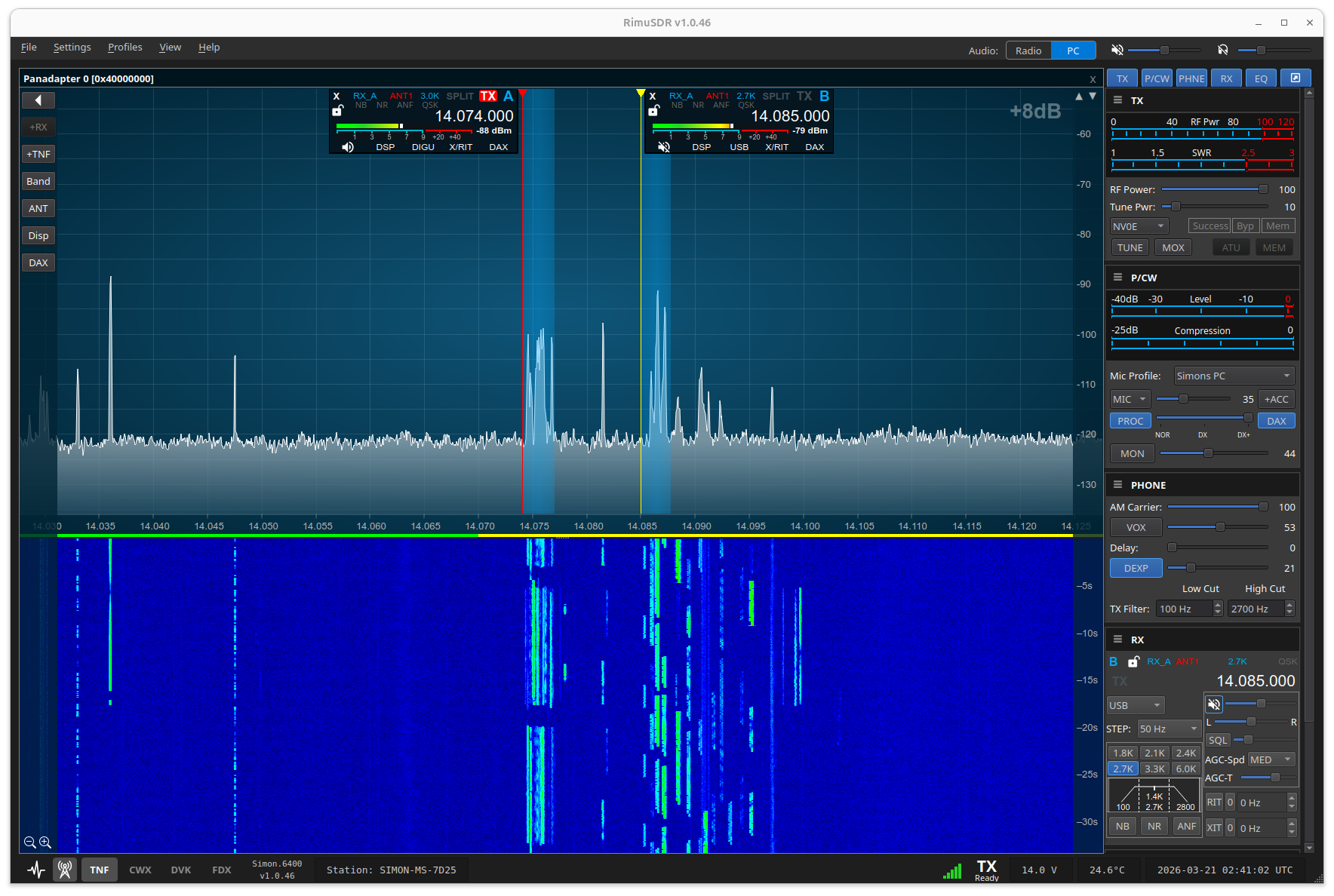
The core SDR client for Linux and the center of the integrated RimuSDR suite.

  • Panadapter and waterfall display
  • Complete radio control interface
  • multiFLEX and SmartLink support
  • Integrated CWX keyer
  • Supports FlexRadio 6000, 8000, and Aurora series
  • Native Linux client experience
Learn more about RimuSDR
DAX

DAX

The integrated audio component for digital modes and signal-analysis workflows.

  • Virtual audio channels for Linux
  • Processed audio for FT8, PSK31, RTTY, and similar modes
  • Raw I/Q streams for CW Skimmer and SDR-Bridge
  • Built into the RimuSDR suite
See RimuSDR details and screenshots
CAT

CAT

The integrated control component for CAT-compatible logging and radio software.

  • Virtual serial port interface for legacy radio software
  • Lets traditional ham applications read and control your FlexRadio
  • Bridges network-based Flex architecture to CAT workflows
  • Built into the RimuSDR suite
See RimuSDR details and screenshots

Get Started with RimuSDR

Download, install, and activate RimuSDR in three simple steps.

1. Download
Choose the package that matches your system: Debian/Ubuntu packages, Raspberry Pi builds, or AppImage.
2. Install
Install the .deb package or run the AppImage. Full installation instructions provided for each platform.
3. Activate
Enter your license code and callsign in Help → Activate License to start using RimuSDR.

Why Linux?

Six practical reasons Linux is becoming a smarter choice for everyday desktop computing.

A Growing Desktop Shift
More individuals and organizations are re-evaluating Linux as converging trends make it an increasingly practical desktop platform.
Cost-Effective and Future-Proof
Linux is free to use and upgrade, helping extend the life of existing hardware without licensing costs or forced replacement cycles.
A Better Path for Older Hardware
Many systems blocked from Windows 11 can still run Linux efficiently, including older PCs that remain fully capable and serviceable.
The End of Windows 10 Support
As Windows 10 support ends and vendor compatibility narrows, Linux offers a secure, supported path that does not require new hardware.
A Cleaner Experience
Linux provides a more streamlined, privacy-respecting environment without built-in promotions, forced cloud integration, or setup friction.
Modern, Polished Desktops
Cinnamon, KDE Plasma, and GNOME deliver stable, refined desktop experiences with familiar workflows and much greater control.

Tested Environments

RimuSDR has been tested across current Debian and Ubuntu family distributions on x86_64, with ARM 64 validation currently focused on Raspberry Pi platforms.

AppImage builds are also provided for other Linux distributions, offering a portable way to run RimuSDR without distro-specific packaging, though those environments are not all tested to the same extent.

Distribution .deb AppImage
Ubuntu 24.04.4 LTS x86_64 OK OK
Linux Mint 22.2 x86_64 OK OK
Debian 13 x86_64 OK OK
Zorin OS 18 Core x86_64 OK OK
Pop!_OS 24.04 x86_64 OK OK
MX Linux x86_64 OK
Kubuntu x86_64 OK
Manjaro x86_64 OK
Raspberry Pi 4B / 5 ARM64 OK N/A
Ubuntu 24.04.4 LTS ARM64 N/A EXP

RimuSDR Packaging Options

RimuSDR is available as native packages for supported Ubuntu, Debian, and Raspberry Pi systems, with AppImage builds provided as a portable option for other Linux distributions.

Debian/Ubuntu (.deb) - amd64 Raspberry Pi - ARM64 AppImage - x86_64 AppImage - aarch64
Download options
- Linux amd64/x86_64 or arm64
- Native packages for tested Ubuntu and Debian systems
- Raspberry Pi 4B and Pi 5 builds
- AppImage for portable use on other Linux distributions
- Modern GPU recommended
- FlexRadio 6000 / 8000 / Aurora series

Hardware Requirements

Minimum and recommended hardware for running RimuSDR in a typical station environment.

Minimum Hardware Requirements
  • CPUx86_64 (Intel/AMD) or ARM64/aarch64 processor, dual-core 1.5 GHz or faster
  • RAM2 GB minimum
  • Disk Space500 MB
  • NetworkEthernet or WiFi with stable low-latency connection
  • Display1366×768 minimum resolution
Recommended for Typical Station Use

RimuSDR itself is not resource-intensive, but most operators run it alongside digital mode software (WSJT-X, FLDigi), logging programs, and skimmers. These recommended specs reflect that real-world workload.

  • CPUQuad-core 2.0 GHz or faster (Intel i5/i7, AMD Ryzen 5 or better)
  • RAM8 GB or more
  • DiskSSD with at least 1 GB free space
  • NetworkWired Ethernet strongly recommended; WiFi may introduce latency in radio command response
  • Display1920×1080 or higher; ultrawide or dual monitors beneficial for spectrum and waterfall displays
Notes
  • Raspberry Pi 4 (ARM64, quad-core 1.5–1.8 GHz, 4–8 GB RAM) meets the minimum requirements and is a supported platform.
  • On slower hardware, reducing panadapter FPS and FFT resolution in the display settings will significantly reduce CPU and network load.
  • The primary performance bottleneck in a typical shack is not RimuSDR but the combination of all running software together.

Documentation & support

Everything you need to install, configure, and operate the RimuSDR suite.

×