Flex Control knob
The FlexControl Multi-function Tuning Knob is a tactile, ergonomic dial for controlling software-defined radios. It connects over USB, and RimuSDR supports it for frequency tuning, mode selection, and other radio controls.
The knob's functions can be configured to suit your operating preferences.
Permissions
The knob needs dialout group membership
On Linux, the Flex Control knob requires your user to be a member of the
dialout group to reach the serial ports. If the knob does not appear in
RimuSDR, this is almost always the cause.
-
Add your user to the
dialoutgroup: -
Log out, then log back in. The change takes effect at the next login.
-
Start RimuSDR and confirm the knob appears.
Configuring the knob
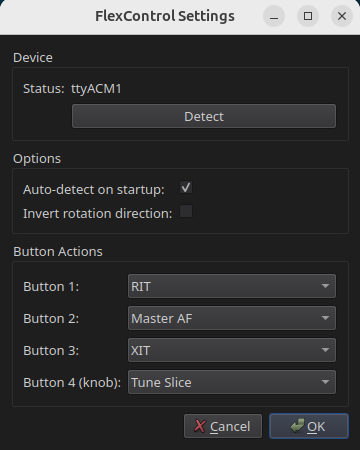
Go to Settings › FlexControl Knob.... Each button on the knob is assigned an option in the Button Actions group. When you press a button, the knob controls the value of that option.
The Double-click column shows what a double-click does for each button's action. A double-click on any button runs the double-click action of the active knob mode. For example, in RIT mode a double-click clears and turns off RIT.