Local discovery
RimuSDR finds FlexRadio 6000, 8000, and Aurora series radios on your local network by itself. There is no address to enter and nothing to configure.
This is the usual way to connect, and the easiest.
The radio must be on the same subnet
A radio announces itself with broadcast packets, and routers do not
forward those between subnets. The computer running RimuSDR must be on the
same subnet as the radio. If the radio is at 192.168.0.10, the computer
needs an address in the 192.168.0.* range.
To reach a radio on another subnet, use Direct IP instead.
Choosing a radio
Select On your network in the list on the left. Every radio RimuSDR has found is listed. For most operators that is one radio.
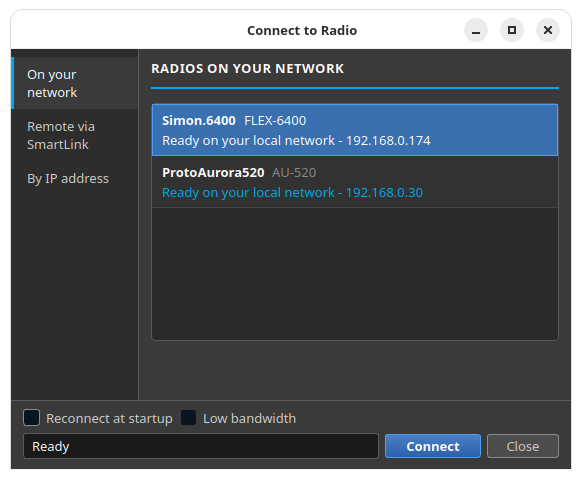
Each row describes one radio on two lines:
- The radio's nickname, followed by its model, such as
FLEX-6400orAU-520. - Its status and address on your network.
Searching runs continuously, so a radio that is switched on after you open the dialog appears on its own. There is no refresh button because none is needed.
Connecting
-
Select the radio.
-
Click Connect.
The row and the status line both report progress while RimuSDR connects. If the attempt fails, the reason is shown in the same two places rather than disappearing.
If the radio does not appear
Work through these in order.
-
Confirm the radio is powered on and has finished starting.
-
Confirm the computer and the radio are on the same network.
Guest Wi-Fi networks are the common trap. Many of them isolate clients from the rest of the network, so the radio is unreachable even though both devices are on the same router.
-
Confirm no VPN is capturing your traffic.
An active VPN can send your network traffic somewhere else entirely. If the radio is genuinely on the far side of a VPN, connect with Direct IP.
-
Confirm no firewall is blocking discovery.
-
Compare the two addresses. The computer and the radio must share a subnet.
The list keeps searching the whole time, so a radio appears the moment the problem is fixed. You do not need to close and reopen the dialog.