N1MM+ spot port
The N1MM+ spot port receives bandmap spots broadcast by N1MM+ Logger and places them on the panadapter in RimuSDR, colored by their status.
It carries spots in one direction only and needs no slice. UDP is its only transport.
Create the port
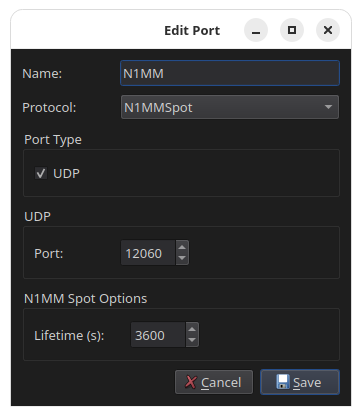
- Give the port a name, for example
N1MM. - Set Protocol to N1MMSpot.
- The Port Type is set to UDP automatically.
- Enter the UDP port that N1MM+ sends spots to. N1MM+ uses
12060by default. - Set the Lifetime in seconds. This is how long a spot stays on the panadapter before it expires.
- Click Save.
- In N1MM+, enable the broadcast of spot data to this computer and port.
Matching the two ends
The ports and the address must match
The UDP port in RimuCAT must match the port N1MM+ broadcasts to, and N1MM+ must send to the address of the computer RimuCAT runs on.
Spots that N1MM+ deletes are removed from the panadapter as well.