Band plan files
RimuSDR draws a color-coded band privilege bar across the top of the panadapter, so you can see where the CW, phone, digital, and beacon segments fall on the band you are listening to.
RimuSDR ships with six plans: ARRL US, IARU Regions 1, 2, and 3, RAC Canada, and RSGB UK. If none of those match your country, write your own. No programming experience is required.
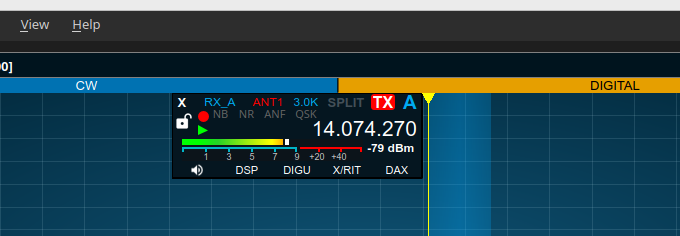
What a band plan file contains
A band plan is a single plain-text .json file with two parts. Edit it with
Notepad, TextEdit, gedit, or any text editor.
mode_colors- Your list of operating modes, and the color each one is drawn in. Define as many modes as you need. Colors are standard HTML color codes, and the mode name becomes the on-screen label.
license_classes- Each license class in your country, and the frequency ranges it may use. Name the classes as your regulator does. Each class lists its own band segments.
See File format for the detail.
Step 1 - Start from a copy
Do not edit the files that came with RimuSDR
Installing an update replaces them, and your edits are lost. Start from a fresh copy saved somewhere you can write to, such as your Documents folder, and give it a name of your own.
Download a starting plan
These are the same six plans that ship with RimuSDR. Pick the one closest to your country's band plan.
| Plan | Covers | Notes |
|---|---|---|
| ARRL US | United States | Five license classes, whose segments differ within the same bands. |
| IARU Region 1 | Europe, Africa, the Middle East, northern Asia | One license class, around twenty mode categories. |
| IARU Region 2 | The Americas | One license class. The simplest starting point. |
| IARU Region 3 | Asia-Pacific and Oceania | One license class, structured like Region 2. |
| RAC Canada | Canada | Three license classes. Basic has 6 m and above only. Basic with Honours and Advanced add 160 m to 10 m, and are identical to each other. |
| RSGB UK | United Kingdom, 2200 m to 6 m | Three license classes. UK Full adds 630 m and 60 m. UK Intermediate and UK Foundation are identical to each other. Contributed by Jonathan Perkins, G4IVV. |
If your country issues several license classes, copy from ARRL US, RAC Canada or RSGB UK, because their classes have different privileges. In ARRL US the classes share bands but differ in the segments within them. In RAC Canada and RSGB UK each class has the same segments, but a different set of bands.
Or copy one from your installation
| Platform | Location |
|---|---|
| Windows | C:\Program Files\RimuSDR\resources\band-privileges\ |
Linux (.deb or RPM) |
/usr/share/rimusdr/band-privileges/ |
| Linux (AppImage) | Inside the bundle |
To get the files out of an AppImage:
Keep your copy somewhere writable
On Windows you cannot save changes inside C:\Program Files. This is
another reason to keep your own file in Documents.
Step 2 - Load your file into RimuSDR
The panadapter picks up the change immediately. No restart, and no need to reconnect to the radio.
-
Go to Settings › Display Settings and choose the Sub-bands tab.
-
Set Band Privileges File to Custom….
A file box and a Browse… button appear underneath.
-
Click Browse… and select your
.jsonfile. -
Choose your class from the License Class list.
This list is filled in from your file. If your class names appear here, the file loaded correctly.
-
Tick Show Sub-Bands, then click OK.
Show Sub-Bands cannot be enabled while License Class is None, because privileges depend on the class.
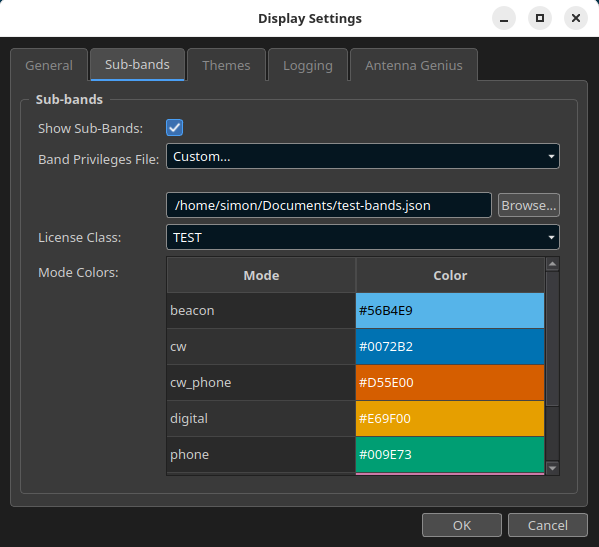
The edit-and-check loop
While you work on your file, save it in the text editor, then open Display Settings and click OK. RimuSDR re-reads the file from disk every time, so your latest edits appear right away.
The Mode Colors table on the Sub-bands tab lists every mode your selected class uses, with a swatch of the color you gave it. It is the quickest way to confirm your colors came through as intended.
Keep the file where it is
RimuSDR remembers the full path to your file. If you move, rename, or delete it, RimuSDR quietly falls back to the ARRL US plan. If your sub-bands suddenly look American again, check the file is still in place.