CAT port
The CAT port provides bidirectional radio control - frequency, mode, and PTT - to external software.
Multiple simultaneous CAT connections are supported. Use a different port number for each application and they can all control the radio at the same time.
TCP
TCP is the recommended transport for modern software.
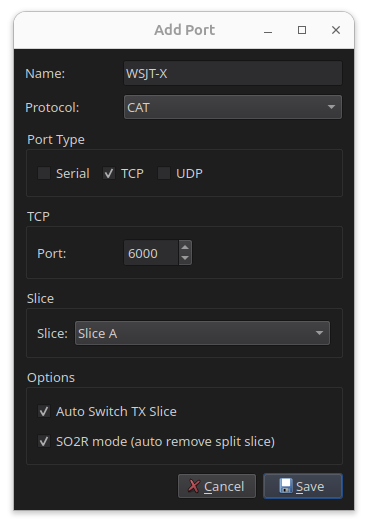
- Give the port a name, for example
WSJT-X. - Set Protocol to CAT.
- Set Port Type to TCP.
- Enter an unused port above
1024. - Select the slice to associate with the port.
- Click Save.
Virtual serial
Use a virtual serial port for software that only supports serial CAT.
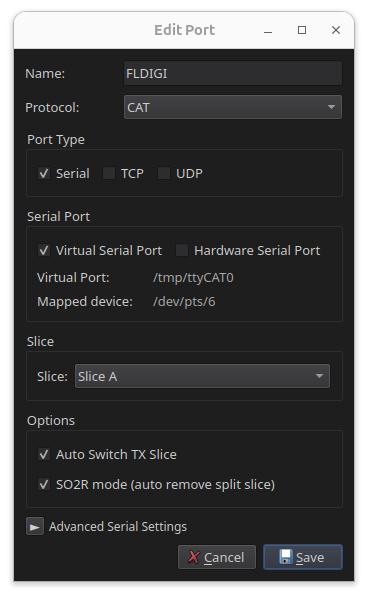
- Give the port a name, for example
Fldigi. - Set Protocol to CAT.
- Set Port Type to Virtual Serial.
- Select the slice to associate with the port.
- Click Save.
- Note the device path shown in RimuCAT, for example
/tmp/ttyCAT0, and enter it in your application.
The virtual port exists only while RimuCAT runs
If RimuCAT is closed or disconnected, the port disappears. Applications holding it open have to reconnect.
Hardware serial
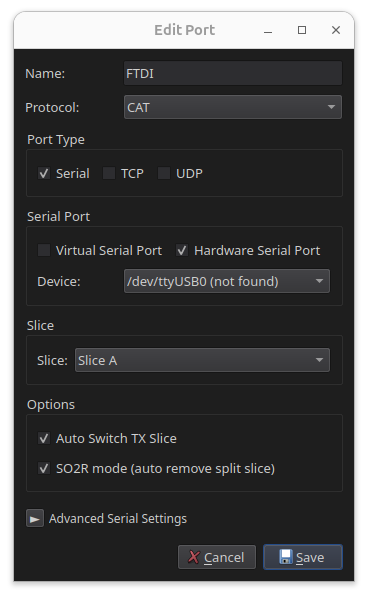
- Give the port a name, for example
Logger. - Set Protocol to CAT.
- Set Port Type to Hardware Serial.
- Choose the physical device from the list, for example
/dev/ttyUSB0. - Set the baud rate to match your hardware or software.
- Select the slice to associate with the port.
- Click Save.
Serial devices need dialout group membership
On Linux, access to serial port devices requires membership in the
dialout group. If the port does not appear, or RimuCAT cannot open it,
add your user to the group:
Log out and log back in for the change to take effect.