Wavelog / Cloudlog port
This is the one port with no serial, TCP, or UDP transport to configure. It talks to your logbook's HTTP API directly, pushing live frequency, mode, and power as you operate, and answering click-to-tune requests from the log.
There is no WaveLogGate or CloudlogCAT process to install.
Create the port
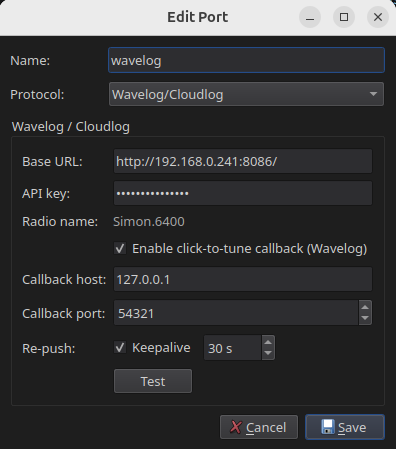
- Give the port a name, for example
wavelog. - Set Protocol to Wavelog/Cloudlog.
- Enter the Base URL and API key of your logbook.
- Enable click-to-tune and set a callback host and port your logbook can reach, if you want to tune the radio from the log.
- Click Test to confirm RimuCAT reaches the logbook.
- Click Save.
No slice to select
The radio name is taken from the FlexRadio nickname, and the port follows whichever slice is active. The logbook always shows the slice you are working.
The logbook side
For creating the API key and finding your base URL, see Wavelog and Cloudlog.