Diagnostics
The Diagnostics dialog shows what the radio knows about: its limits and settings, the clients connected to it, every panadapter and slice it has created, its tracking notch filters, its spots, and which licensed features are enabled. The figures are the radio's own state as RimuSDR has received it, shown without interpretation.
This is a page for developers and for operators debugging a multiFLEX setup. For everyday operating it has little to offer; for a problem with the network or with audio, use Statistics instead.
Go to View › Diagnostics.... The entry is available while a radio is connected. The dialog is modal, so close it to return to the main window.
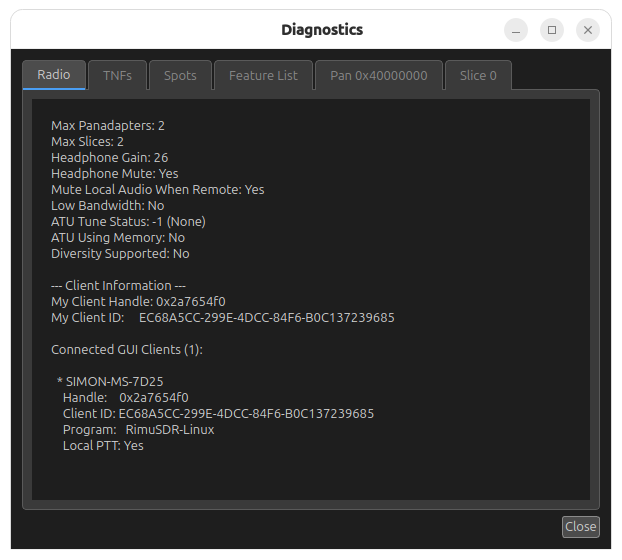
The screenshot is from a two-slice radio with one station connected. The radio has created one panadapter and one slice, so the dialog has one Pan tab and one Slice tab.
Every client's panadapters and slices are listed
The Pan and Slice tabs cover every panadapter and slice the radio has created, for every connected client, not only this one. In a multiFLEX setup that includes the other stations' panadapters and slices. Each Slice tab says who owns it; each Pan tab shows the owning client's handle.
How the dialog refreshes
The figures update once per second while the dialog is open.
The set of tabs is fixed when the dialog opens. A panadapter or slice created after that has no tab until you close the dialog and open it again.
Radio
The radio's limits, a few of its settings, and the clients connected to it.
- Max Panadapters and Max Slices
- How many panadapters and slices this radio model can create. These are radio-wide totals, shared by every connected client.
- Headphone Gain and Headphone Mute
- The radio's own headphone output.
- Mute Local Audio When Remote
- Whether the radio silences its local speaker and headphone output while a remote client is connected.
- Low Bandwidth
- Whether this connection was made with SmartLink's low-bandwidth option.
- ATU Tune Status
- The state of the antenna tuner's last tune, as a number and its name: None, Not Started, In Progress, Bypass, Successful, OK, Fail Bypass, Fail, Aborted, or Manual Bypass.
- ATU Using Memory
- Whether the tuner is applying a stored tuning solution.
- Diversity Supported
- Whether this radio model can run diversity reception.
Client Information
- My Client Handle
- The handle the radio assigned to this RimuSDR session. Every panadapter and slice carries the handle of the client that owns it, so this is the value to compare against.
- My Client ID
- The identifier RimuSDR presents to the radio as a GUI client. It is generated once and kept, so the radio can recognize the same station across reconnects.
- Connected GUI Clients
- One entry for each station connected to the radio. The entry marked with an asterisk is this RimuSDR session. Each entry shows the station name, the client handle, the client ID, the program that made the connection, and whether that station has Local PTT. When the station has a transmit slice, TX Ant and TX Freq are shown too.
TNFs
One row for each tracking notch filter the radio holds.
| Column | Meaning |
|---|---|
| ID | The radio's number for the notch. |
| Frequency (MHz) | Where the notch is centered. |
| Permanent | Whether the notch is saved by the radio and restored on the next power-up. |
| Depth | Normal, Deep, or Very Deep. |
| Bandwidth (Hz) | How wide the notch is. |
Spots
One row for each spot the radio holds, from every source that has sent it spots.
| Column | Meaning |
|---|---|
| Callsign | The spotted station. |
| Frequency (MHz) | The receive frequency of the spot. |
| Date/Time | When the spot was made, in UTC. |
| Priority | The spot's priority, as sent by its source. |
| Lifetime (d HH:mm:ss) | How long the spot lives before the radio discards it, as days, hours, minutes and seconds. |
| Color | The spot's text color. The cell is filled with the color itself. |
| Background Color | The spot's background color, filled the same way. |
| Comment | Free text sent with the spot. |
Feature List
The licensed features the radio reports, one row each: Alpha, SmartLink, MultiFlex, Wideband Pan, Noise Floor, Noise Reduction, DVK, Autotune, Diversity/ESC, NAVTEX, Rapidm Logging, Panadapter Visuals, and Filter Preset Conf.
- Enabled
- Yes in green or No in red. Not Reported means the radio sent no license information for that feature.
- Reason
- Why the feature is in that state: License File, SmartSDR+, Early Access, Built-In, or Unknown.
Pan tabs
One tab for each panadapter the radio has created, for every client. The tab is named by the panadapter's stream ID in hexadecimal, for example Pan 0x40000000.
- Stream ID
- The identifier of the panadapter's data stream.
- Client Handle
- The client that owns the panadapter. Compare it with My Client Handle on the Radio tab to tell your own panadapters from another station's.
- Center Frequency, Bandwidth, and Frequency Range
- What the panadapter covers, in MHz. The range is the center plus and minus half the bandwidth.
- Width and Height
- The size of the display the owning client asked for, in pixels. The radio computes one FFT bin per pixel of width.
- Average, Weighted Average, and FPS
- The panadapter's averaging and frame rate settings.
- Auto Center
- Whether the panadapter recenters on the active slice.
- Band
- The band the panadapter is on, as the radio names it.
- DAX IQ Channel
- The DAX IQ channel streaming this panadapter's I/Q data, or None.
- RX Ant and RF Gain
- The receive antenna and preamplifier setting.
- Wide
- Whether the panadapter is in wideband mode.
- WNB
- The wideband noise blanker and its level.
- XVTR
- The transverter assigned to the panadapter, or None.
- Loop A and Loop B
- Whether the receive loops are switched in.
Slice tabs
One tab for each slice the radio has created, for every client, named by the slice's index: Slice 0, Slice 1, and so on.
- Owner
- THIS CLIENT when the slice sits on one of this session's panadapters, Other Client when it belongs to another station.
- Index and Letter
- The slice's number and the letter shown in its flag.
- Panadapter Stream ID and Panadapter Client Handle
- The panadapter the slice sits on, and the client that owns that panadapter.
- Frequency, Step, and Mode
- The tuned frequency in MHz, the tuning step in Hz, and the demodulation mode.
- Active and Transmit
- Whether this is the active slice, and whether it is the transmit slice.
- Mute and Volume
- The slice's audio mute and gain.
- DAX Channel
- The DAX channel carrying the slice's audio, or None.
- XIT and RIT
- Whether each offset is on, and its value in Hz.
- Noise reduction
- Each processor with its state: NR with its level, LMS NR, Speex NR, RNNoise, and NRF.
- Noise blankers
- NB and WNB, each with its level.
- Notch filters
- ANF (Legacy) with its level, LMS ANF, and ANFT (FFT).
- APF
- The audio peak filter.
- Diversity
- Whether diversity is on. Diversity Role is Parent, Child, or Not Active, and Paired with Slice names the partner slice while diversity is on. ESC Enabled is the enhanced signal clarity setting.
- RX Antenna and TX Antenna
- The antennas assigned to the slice.
- RF Gain
- The preamplifier setting.
- AGC Mode and AGC Threshold
- Off, Slow, Medium, or Fast, and the threshold.
- Filter Low and Filter High
- The receive filter edges, in Hz relative to the carrier.
Reading the dialog in a multiFLEX setup
The dialog is the quickest way to see what another station is doing on the same radio:
- On the Radio tab, find the other station under Connected GUI Clients and note its handle.
- Open each Pan tab and compare Client Handle with that value.
- Open each Slice tab. Owner says Other Client for the other station's slices, and Panadapter Client Handle says which station.
Together these show which panadapters and slices each station holds, which station has the transmit slice, and which one has Local PTT.