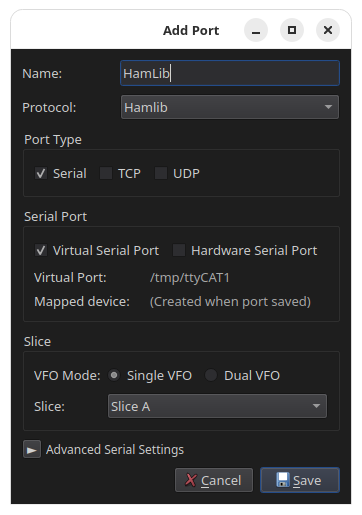
Hamlib rigctld port
The Hamlib port speaks the rigctld network dialect. Use it for software
configured as Hamlib NET rigctl instead of a Kenwood rig, such as WSJT-X,
Fldigi, Not1MM, and GridTracker.
More than one program can connect to the same Hamlib port at the same time.
TCP
TCP is the usual choice, because rigctl clients connect over the network.
- Give the port a name, for example
Hamlib. - Set Protocol to Hamlib.
- Set Port Type to TCP.
- Leave the port at
4532, the standard rigctld port, unless it is in use. - Select the VFO Mode. Use Single VFO for one slice, or Dual VFO for split and for loggers that work two VFOs.
- Select the slice for each VFO.
- Click Save.
In your software, set the rig type to Hamlib NET rigctl and the network
server to 127.0.0.1:4532.
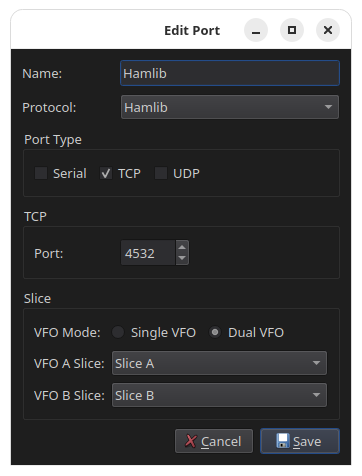
VFO modes
- Single VFO
- The client sees VFO A only. Split is not available.
- Dual VFO
- A second slice is bound as VFO B. The client must also be set up for two VFOs, or it uses VFO A alone.
Virtual serial
Select virtual serial only if your software expects the rigctl dialect on a serial device.
- Give the port a name, for example
Hamlib. - Set Protocol to Hamlib.
- Set Port Type to Virtual Serial.
- Select the VFO mode and the slice for each VFO.
- Click Save.
- Note the device path shown in RimuCAT, for example
/tmp/ttyCAT1, and enter it in your application.