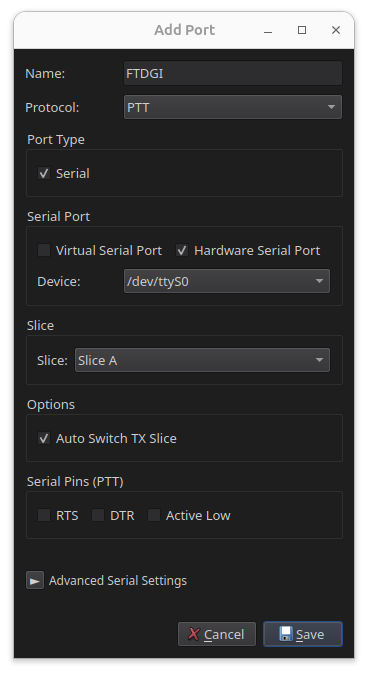
PTT port
The PTT port provides a transmit keying interface separate from CAT control. Use it when your application keys the radio independently of CAT commands.
PTT ports are serial only. There is no TCP or UDP option.
Virtual serial
- Give the port a name, for example
PTT-VSP. - Set Protocol to PTT.
- Set Port Type to Virtual Serial.
- Select RTS or DTR to match what your application uses for keying.
- Check Active Low only if your application keys the radio by dropping the line rather than raising it.
- Select the slice to associate with the port.
- Click Save.
- Note the device path shown in RimuCAT and enter it as your application's PTT port.
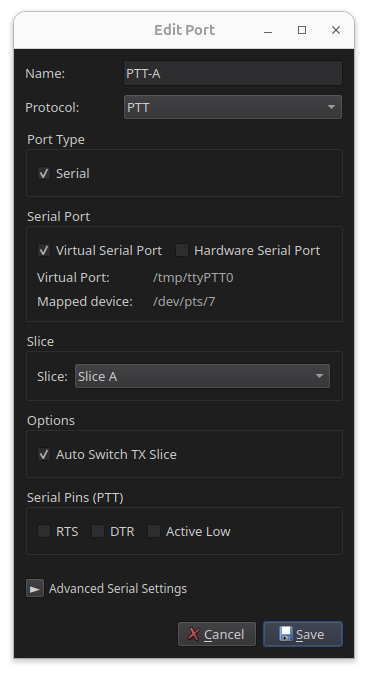
Auto Switch TX Slice
With Auto Switch TX Slice enabled, the port makes its slice the transmit slice before keying.
Clear it if the port should key the radio without changing which slice transmits. The slice selector then disappears, because the port no longer needs one.
Hardware serial
- Give the port a name, for example
PTT-Serial. - Set Protocol to PTT.
- Set Port Type to Hardware Serial.
- Choose the physical device from the list, for example
/dev/ttyUSB0. - Select RTS or DTR to match what your hardware uses for keying.
- Check Active Low only if your hardware keys the radio by dropping the line rather than raising it.
- Select the slice to associate with the port.
- Click Save.
Serial devices need dialout group membership
On Linux, access to serial port devices requires membership in the
dialout group. If the port does not appear, or RimuCAT cannot open it,
add your user to the group:
Log out and log back in for the change to take effect.