Radio Setup - External
The External tab of Radio Setup holds settings for station accessories that RimuSDR talks to directly, rather than through the radio: the 4O3A Power Genius XL amplifier and the Antenna Genius antenna switch.
Go to Settings › Radio Setup... and choose the External tab.
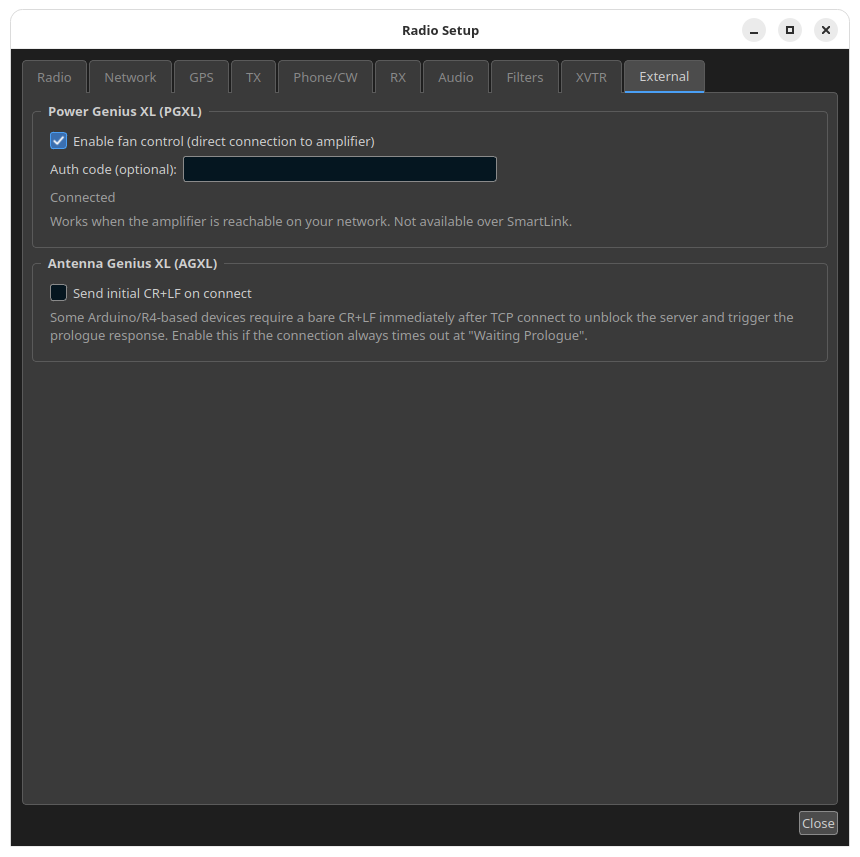
Changes on this tab take effect at once. There is no OK button to press.
Power Genius XL (PGXL)
The radio already reports the amplifier's power, SWR and temperature in the AMP panel, but it does not carry the amplifier's fan mode. To read and change the fan mode, RimuSDR opens a second connection straight to the amplifier.
- Enable fan control (direct connection to amplifier)
-
Off by default. When it is on, RimuSDR connects to the amplifier at the address the radio reports for it, on TCP port 9008. No address has to be entered.
Once the connection is up, a Fan drop-down appears in the AMP panel, below the temperature reading, with Standard, Contest and Broadcast. The drop-down always shows the mode the amplifier reports, not the one last clicked, so a change the amplifier does not accept is never shown as done.
- Auth code (optional)
- Only needed if the amplifier is set to require an auth code. Leave it empty otherwise. The code is hidden as you type, is up to 16 characters, and cannot contain spaces. It is used when you leave the field.
Local network only
Fan control works when the amplifier is reachable from this computer on your network. It is not available over SmartLink, and the Fan drop-down stays hidden there. If a firewall sits between the computer and the amplifier, it must allow TCP port 9008.
RimuSDR changes the fan mode for the running amplifier only. It never saves the change into the amplifier's stored settings, because saving settings restarts the amplifier.
Connection status
The line under Auth code shows the state of the link to the amplifier.
| Status | What it means |
|---|---|
| Disabled | Enable fan control is off. |
| Waiting for the radio to report an amplifier | Fan control is on, but the radio has not reported an amplifier, or RimuSDR is not connected to a radio. |
| Connecting... | RimuSDR is opening the connection, or waiting for the amplifier to identify itself. |
| Connected | The link is up. The Fan drop-down is shown in the AMP panel. The line can also include the amplifier's address. |
| The amplifier requires an auth code | Shown in red. The amplifier asked for a code and none is entered. Enter the code in Auth code, and RimuSDR tries again straight away. |
| The amplifier rejected the auth code | Shown in red. Correct the code in Auth code, and RimuSDR tries again straight away. |
| Reconnecting - reason | The connection failed or dropped. RimuSDR tries again every 5 seconds. |
The most common reasons after Reconnecting are:
- Amplifier did not accept the connection
- The connection was refused, or not answered within 30 seconds. Check that this computer can reach the amplifier's address. The amplifier also accepts only a small number of control connections, and it lets an extra one time out rather than refusing it. If other programs are connected to the amplifier, close one of them.
- Amplifier closed the connection
- The amplifier ended the session or the connection was lost, for example because the amplifier restarted.
- No response from the amplifier
- The connection opened, but the amplifier did not identify itself within 10 seconds.
Antenna Genius XL (AGXL)
- Send initial CR+LF on connect
-
Off by default. When it is on, RimuSDR sends a bare carriage return and line feed as soon as the connection to the Antenna Genius opens.
Some Arduino/R4-based Antenna Genius compatible devices wait for this before they send their greeting. Without it, the device sends nothing, and the Antenna Genius window (Settings › Antenna Genius...) reports Prologue timeout after 10 seconds and keeps retrying.
Turn this on only if every connection to your device ends that way. The setting is used from the next connection attempt.