USB passthrough port
A passthrough port relays raw bytes in both directions between a serial port on your computer and a FlexRadio USB cable. This lets software on the PC reach hardware plugged into the radio.
There is no slice and no protocol translation. The bytes pass through untouched.
Configure the cable on the radio first
Set the cable up as a passthrough cable on the radio, then select it here by serial number. If the cable list is empty, the radio has no USB cable configured for passthrough. Configure it on the radio, then reopen the dialog.
Virtual serial
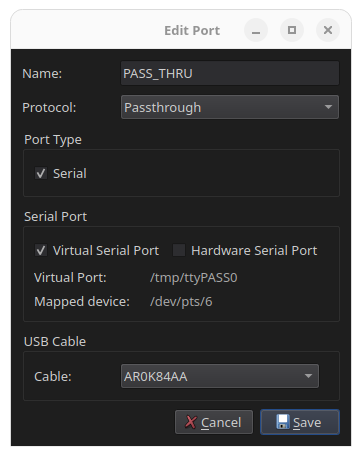
- Give the port a name, for example
PASS_THRU. - Set Protocol to Passthrough.
- Set Port Type to Virtual Serial.
- Select the Cable by its serial number.
- Click Save.
- Note the device path shown in RimuCAT, for example
/tmp/ttyPASS0, and enter it in the software that talks to the attached hardware.
Hardware serial
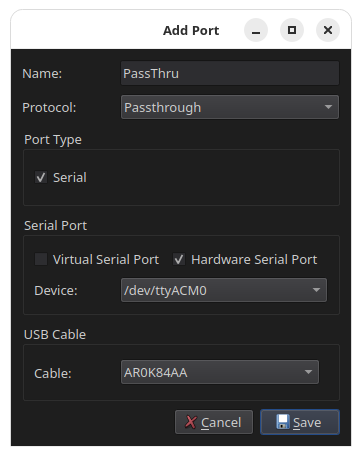
- Give the port a name, for example
PassThru. - Set Protocol to Passthrough.
- Set Port Type to Hardware Serial Port.
- Choose the physical device from the list, for example
/dev/ttyACM0. - Select the Cable by its serial number.
- Click Save.
Serial devices need dialout group membership
On Linux, access to serial port devices requires membership in the
dialout group. If the port does not appear, or RimuCAT cannot open it,
add your user to the group:
Log out and log back in for the change to take effect.