Connecting to your radio
RimuSDR connects to FlexRadio 6000, 8000, and Aurora series radios three ways. All three live in one place, the Connect to Radio dialog.
| Method | Use when |
|---|---|
| Local discovery | The radio is on the same network segment as your computer. |
| Direct IP | The radio is reachable by address but not by discovery, typically across a VPN. |
| SmartLink | The radio is remote, reached over the internet. |
The dialog is built for operators with more than one radio, or with access to several SmartLink accounts. Whether you have two radios on the bench, or your own radio and a club radio, you can move between them without re-entering credentials.
Opening the dialog
RimuSDR opens the dialog for you at startup when no radio is connected, already searching your network.
You can also open it yourself at any time, from File › Connect to Radio.
Choosing a method
Select the method in the list on the left - On your network, Remote via SmartLink, or By IP address. The panel on the right changes to match.
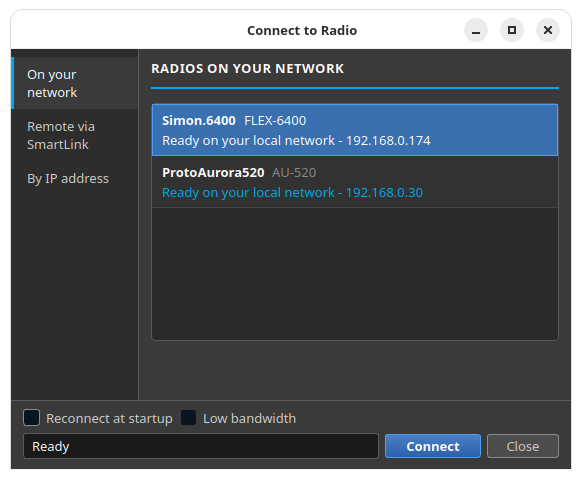
Whichever method you choose, the bottom of the dialog stays the same:
- Reconnect at startup
- Connects to this radio automatically the next time RimuSDR starts, instead of opening this dialog.
- Low bandwidth
- Asks the radio to send less data, for use over a constrained link.
- Status line
- Reports what the dialog is doing - searching, connecting, or the reason a connection failed.
- Connect
- Starts the connection to whatever is selected.
Changing radios
While you are connected to a radio, File › Connect to Radio is disabled. Disconnect from the current radio before you connect to another one.
-
Disconnect from the File menu.
The Connect to Radio dialog opens again by itself.
-
Select the other radio and click Connect.
MultiFLEX shared operation
FlexRadio supports MultiFLEX, which lets several operators connect to the same radio at the same time. Each operator gets independent slices, panadapters, and DAX access.
RimuSDR joins MultiFLEX sessions automatically when the radio permits it. No configuration is necessary.