Using TCI
TCI is a network protocol that digital-mode, logging and skimmer programs use to control a radio and exchange audio with it, over one connection. RimuDAX includes a TCI server. A TCI program connects to RimuDAX, and RimuDAX carries the program's audio and commands to and from your FlexRadio. A program that connects to the server is a "TCI client". In RimuDAX and in your program's settings, this means your program.
With TCI, a program needs no virtual audio device and no CAT port. On Windows, TCI is how RimuDAX works. On Linux, you choose DAX devices or TCI. See DAX or TCI.
Quick start
- In RimuSDR, connect to the radio.
- In RimuSDR, set the slice to DAX channel 1.
- Start RimuDAX. Connect it to the radio and select the RimuSDR station.
- On Linux, click TCI in the Mode row. On Windows, there is no Mode row, so go to the next step.
- In your program, select TCI. Set the address to
127.0.0.1and the port to50001. See Set up your program. - If your program also has a sound device setting, select its TCI devices.
- Check that it works.
The sections below give more detail.
What TCI gives a program
- Receive audio
- The audio of a slice, at the rate the program asks for (48, 24, 12 or 8 kHz).
- Transmit
- Keying, Tune, and the program's transmit audio.
- Frequency and mode
- The program follows the slice, and tuning in the program tunes the slice.
- IQ
- The IQ stream of a panadapter, for skimmer programs, at 48, 96 or 192 kHz where your radio model offers that rate.
- CW
- CW messages and macros from a logger, sent by the radio's CW keyer.
- Spots
- Spots from a logger appear on the panadapter in RimuSDR. Clicking one in RimuSDR tells the program which spot you clicked.
- Meters
- Signal level, and transmit power and SWR while you transmit.
For the full list, and for what is not supported, see TCI support.
Before you start
- RimuSDR is connected to the radio.
- The slice you want to use has a DAX channel set in RimuSDR. The DAX channel decides which TCI port reaches that slice (see Ports).
- For IQ, a DAX IQ channel is set on the panadapter in RimuSDR.
- The TCI program runs on the same computer as RimuDAX. To use another computer, see Programs on another computer.
Turn on TCI
-
Start RimuDAX. Connect it to the radio and select the RimuSDR station.
-
On Linux, click TCI in the Mode row.
The DAX audio devices stop and the TCI server starts. Click DAX to go back to the DAX devices.
On Windows, there is no Mode row. RimuDAX runs TCI only, and the server starts with RimuDAX.
-
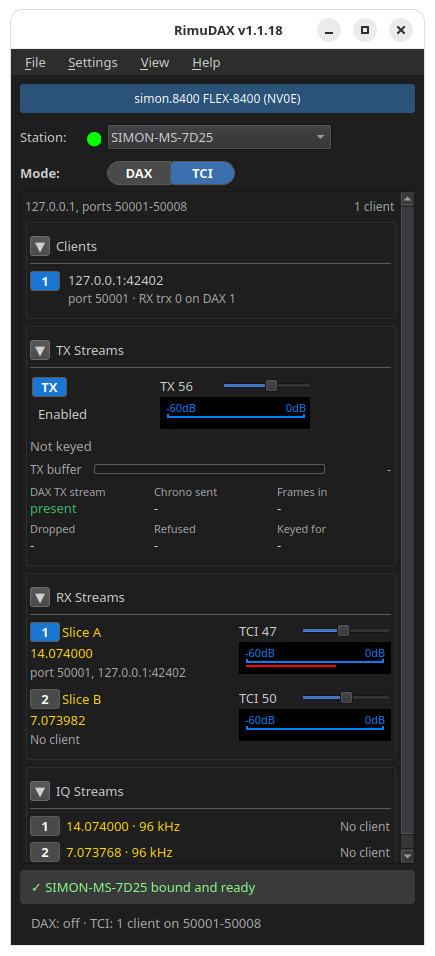
Make sure that the TX button in the TX Streams section reads Enabled if TCI programs must transmit.
The status line at the bottom of the window shows the server, for example
TCI: 0 clients on 50001-50008. On Linux, it also shows the DAX state, for
example DAX: off · TCI: 0 clients on 50001-50008.
Ports
The TCI server listens on eight ports, 50001 to 50008.
| Port | Reaches |
|---|---|
| 50001 | Every DAX channel. Receiver 0 is DAX channel 1, receiver 1 is DAX channel 2, and so on. |
| 50002 to 50008 | One DAX channel each, as the program's only receiver: 50002 is DAX channel 2, up to 50008 for DAX channel 8. |
Most programs use only their first receiver. For such a program, port 5000N reaches DAX channel N. To run two copies of WSJT-X on two slices, put the slices on DAX channels 1 and 2 and connect the copies to 50001 and 50002.
A program that uses several receivers on one connection, such as a skimmer on two slices, connects to 50001.
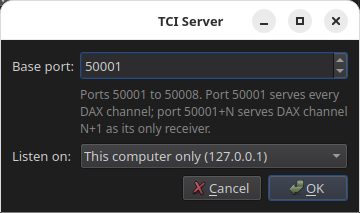
To change the ports, go to Settings > TCI Server... and change Base port. The eight ports always follow the base port.
Set up your program
Use address 127.0.0.1 (or localhost) and the port for the DAX channel of your
slice.
WSJT-X and WSJT-X Improved
Select the rig TCI Client RX1, set the TCI server to 127.0.0.1:50001, and
turn on TCI audio. For the full steps, see WSJT-X with TCI.
Tested with WSJT-X 3.0.2 on Linux and WSJT-X Improved 3.0.0 PLUS on Windows, including FT8 contacts.
MSHV
MSHV needs TCI settings in two windows: Interface Control and the sound settings. See MSHV.
Log4OM
Set the CAT engine to TCIProtocol with address localhost and port 50001.
For the full steps, including spots and CW, see Log4OM.
SDC (skimmer)
SDC needs a DAX IQ channel on the panadapter, and connects to localhost port
50001. For the full steps, see SDC.
DXLog
Connect Radio 1 to port 50001 and Radio 2 to port 50002, on WS interface rows. For the full steps, see DXLog. DXLog is not yet in our test results.
Check that it works
Look at the RimuDAX window after your program connects:
- The bottom of the window names the station, for example HOME-PC bound and ready.
- The Clients section shows one row for each connected program.
- The RX Streams section shows your slice and its frequency on the row for its DAX channel, with the program's port and address.
- The status line shows the number of clients, for example
TCI: 1 client on 50001-50008.
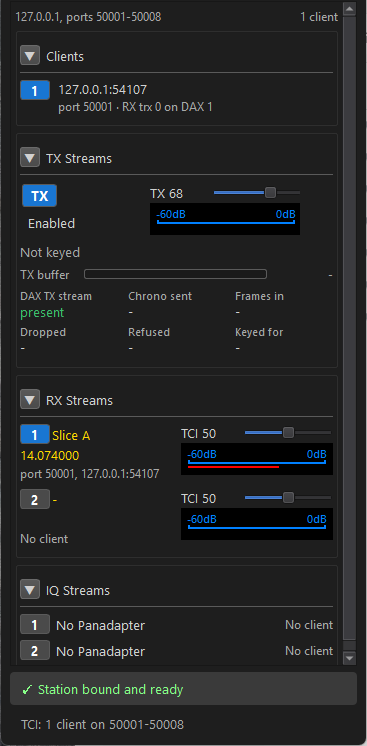
No client means that no program is connected on that channel. It does not mean that RimuDAX has failed. RimuDAX creates no sound devices in TCI mode, so it looks idle until a program connects.
What RimuDAX shows
- Clients
- One row per connected program: its address, its port, and the receiver and DAX channel that it uses. The program that is transmitting has a KEYED tag.
- TX Streams
- The TX button allows TCI programs to transmit. The meter shows the transmit audio level, and the slider sets the transmit gain. Below them, RimuDAX shows whether a program has keyed the radio, and whether the DAX TX stream is present. It shows a warning when a keyed program has no DAX TX stream, or when its audio is being dropped.
- RX Streams
- One row per DAX channel: the slice, its frequency, the program receiving it, the receive gain, and the level.
- IQ Streams
- One row per DAX IQ channel: the panadapter's frequency, the IQ rate, and the program receiving it.
Transmitting
A program can transmit only while the TX button reads Enabled. Click the button to turn transmit off: a transmission in progress stops at once, and the programs stay connected.
When a program transmits, RimuDAX moves TX to that program's slice first.
RimuDAX stops a transmission when the program stops it, when the program disconnects or closes, when you turn off the TX button, and when RimuDAX stops. A transmission that carries the program's own audio also stops when that audio stops for 2 seconds.
The radio can refuse to transmit, for example outside the band. The program then gets the refusal at once, and RimuDAX writes the radio's reason in its log.
CW and spots
- CW messages from a program go out through the radio's CW keyer. A program's stop key, and closing the program, stop the CW at once.
- A logger can correct a callsign while it is being sent, if the correction arrives before the radio sends those characters.
- Terminal mode (
cw_terminal) is not supported. The transmitter drops when the text ends. - A spot from a program stays on the panadapter for 30 minutes. At most 200 program spots are on the radio at once; the oldest goes first. Spots from RimuSDR's own spot sources are never changed.
SmartLink
TCI works when RimuSDR connects to the radio over SmartLink. RimuDAX can connect on the radio's network or over SmartLink. Either way, the TCI program connects to RimuDAX on the computer where RimuDAX runs.
Programs on another computer
By default the server accepts programs on the same computer only. To accept programs from other computers:
Warning
TCI has no password. Anyone on your network can then control the radio, and can transmit while the TX button reads Enabled.
- Go to Settings > TCI Server....
- Set Listen on to All network interfaces.
- Click OK.
- In the program, use the address of the RimuDAX computer instead of
127.0.0.1.
Troubleshooting
- I cannot find a sound device or COM port for RimuDAX
- This is correct. In TCI mode, RimuDAX creates no sound devices and no COM ports. In your program, look for a TCI setting instead. You do not need sound drivers or virtual COM port tools.
- The program does not connect
- Check the status line: the server must be on, and RimuDAX must be in TCI mode. On Windows it always is. A message that a port is in use means another program holds that port; change the base port.
- No receive audio
- Check that the slice has a DAX channel, and that the program uses the port for that channel. Some programs, such as MSHV, also have a sound device setting. Select the program's TCI devices there.
- The program does not reconnect after RimuDAX restarts
- WSJT-X does not reconnect by itself. Restart the program, or reconnect from its radio settings.
- WSJT-X's Tune button stays lit after you turn off transmit
- This is WSJT-X. Click Tune off, then on, to key again.
- No IQ
- Check that a DAX IQ channel is set on the panadapter that holds the slice. The IQ row in RimuDAX shows No Panadapter when none is.
- Log lines about TLS
- The first time a TCI program connects, RimuDAX's log shows
No functional TLS
backend was found
several times. TCI does not use TLS; you can ignore these lines.