What RimuDAX does
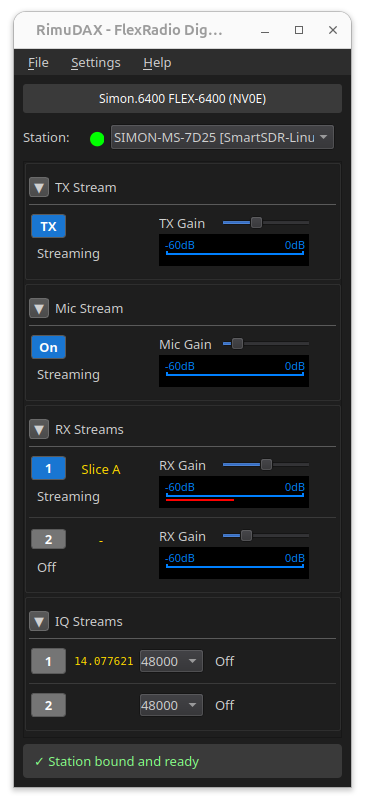
RimuDAX is the audio component of the RimuSDR suite. It carries audio between the radio and Linux applications, using DAX, the FlexRadio Digital Audio eXchange.
It creates virtual PulseAudio devices. Your digital-mode software selects those devices as its soundcard, and audio then travels over the network to and from the radio. No cables, no physical soundcard, and no audio leaving the computer's speakers on its way.
Why it exists
A traditional setup wires a soundcard between the computer and the radio. Software transmits by playing into that card, and receives by recording from it.
A FlexRadio has no such cable. Audio travels over the network as a DAX stream. RimuDAX terminates that stream on the Linux side and presents it as an ordinary audio device, so software that expects a soundcard works unchanged.
What it provides
- Receive channels
- Eight channels, RX1 to RX8. Each corresponds to a DAX channel number set on a slice in RimuSDR, so different software can decode different slices at the same time.
- A transmit channel
- Carries audio from your application to the radio.
- A microphone channel
- Routes a Linux audio input, such as a headset or USB microphone, into the radio as its transmit microphone source.
Every channel appears in PulseAudio with the rimu. prefix, so it is easy to
find in tools such as pavucontrol. See
PulseAudio device names.
It runs separately from RimuSDR
RimuDAX is its own application. It connects to the radio itself, rather than through RimuSDR.
That separation is deliberate. You can run RimuDAX on a Linux machine for audio and CAT while controlling the radio from something else entirely, such as a Flex Maestro or another hosted client, and still have your digital-mode software working on Linux.
RimuSDR must be connected first, with the DAX button active on the slice, so that there is a stream for RimuDAX to pick up. See Connecting RimuDAX.
Availability
RimuDAX is Linux-only. There is no Windows build, so DAX audio is not available when RimuSDR runs on Windows.
Next steps
- Connect RimuDAX to the same radio as RimuSDR.
- Enable the audio channels your software needs.
- Select the PulseAudio devices in that software.